Monday, July 13, 2015

Multi tenant technologies as of July 2015

Multi-tenancy is for density. And density means cost. Higher the density lower would be the price that one has to pay for services and less isolaiton. The best statement about multi-tenancy is this line I from here[1]

"The more resources that are shared, the higher the density. Higher density lowers the provider's costs. At the same time, increased sharing reduces the level of isolation between tenants — the individual systems or services that are being delivered. Isolation is the degree to which one tenant can affect the activity and data of other tenants."


-->

MT AppServerOSGi MTJava MTDocker(Stratos)VM
CPU


Heap size


Thread IO


File RW permissions


Disk IO


Bandwidth


Can count but cannot control


[1]  http://www.ibm.com/developerworks/library/j-multitenant-java/

Wednesday, May 27, 2015

How to setup App Factory 2.2.0 on a MacOS with puppet


 This is how to setup App Factory 2.2.0 on MacOS.

At Client Side (On your MacOS),

1 - First of all  you need to install puppet agent by following this guide https://docs.puppetlabs.com/guides/install_puppet/install_osx.html

2 - Then create a user as afpuppet and give him a password.

3 - Comment out the shell script that tries to generate a random number. This means you'll have to generate it by hand each time you run the sell script.

At the puppet master

Then install a puppet master following this guide - http://wso2.com/library/tutorials/2015/02/tutorial-step-by-step-guide-on-installing-and-configuring-wso2-app-factory-puppet-master-using-virtu/
Now do the following in puppet source in puppet master.

1 - Comment out the installed stuff in wso2base/manifests/packages.pp

2 - Fix the password problem. Meanwhile you need to comment out #managehome property also. Your wso2base/manifests/users.pp will look as follow.


You can generate the password from here - https://ask.puppetlabs.com/question/13940/creating-password-hashes-for-osx-109

4 - Fix the user group problem. Assign 'wheel' to the group

Now you are good to go.


Tuesday, January 1, 2013

How to enable controlled user registration to App Factory

You can control user registration to App Factory via human task enabled BPEL. This feature is introduced in M8 release of App Factory. So you need to have a M8 ++ distribution of App Factory.

Setting up

Step 1 : Transfer the UserCreation.zip to your machine. It is at the following location in the virtual machine.

/home/appfactory/appfactory_deployment/setup/appfactory/wso2appfactory-1.0.0/repository/resources/UserCreationHT.zip

Step 2 : Login to the Carbon console and un-deploy the user creation BPEL


Step 3 : Now upload the UserCreationHT.zip via the management console

How to work with it

When a user sign up to the App Factory a notification will be sent by the BPEL process to the administrator. All users in Admin role can approve the user registration as follows. Admin has to click on View Task and continue to approve/disapprove.


Once the admin user approves it a confirmation email will be generated to the user. This is how it stands for M8. We will continue to improve its user friendliness in the upcoming releases.

Thursday, December 20, 2012

WSO2 App Factory M8 Released!


We shipped out App Factory M8 yesterday! You can download M8 from here.

It was an amazing effort from the whole team and today we are going on Christmas holidays.

New Features of M8 are,


  • Create applications with Git
  • Tagging builds with a name
  • Improved deployment model
  • Moving the servers to standard ports 80/443
  • Ability to work with a Jenkins farm
  • Log download feature
  • Approval UI and human tasks
  • Human task enabled user creation process
  • Search Application Gadget
  • Event Stream View
  • Resource dependency Management UI


We were hoping to ship GitBlit too but couldn't do due to a last minute issue. GitBlit would enable us to talk to any Git repository with AppFactory credentials. The last minute issue was that GitBlit server started throwing unknown host exception even when we set the gitblit.properties with the correct host.

We are happy to be able to deliver all of the features we promised except one!

If you want to know more about App Factory you can watch the webinar.

Tuesday, November 13, 2012

App Factory - Consuming APIs in API Manager

This blog shows how your apps can consume APIs hosted in WSO2 API Manager.

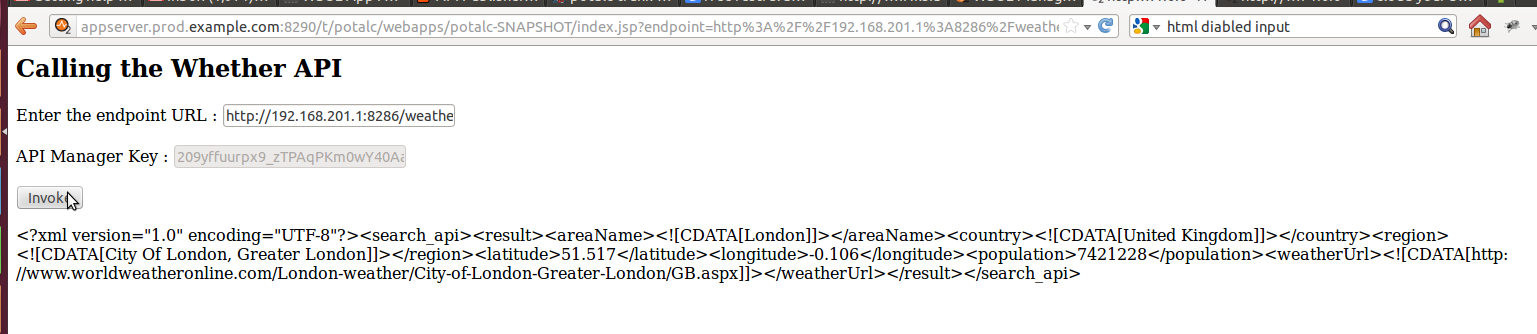
Step 1 : Create a API that gives Washington whether details in sandbox and London whether details in the production environment. Lets call this Weather API. Internally it calls the API of www.worldweatheronline.com


Step 2 : Create an application in AppFactory. Lets call it Customer Portal - cportal application. When you create an application in App Factory it will be automatically created in API-M.


Step 3 : Subscribe the application to the Weather API as follows.


Step 4 : Generate keys by clicking on the create dependencies.


Step 5 : Write your application to get keys by calling the CarbonContext and Registry APIs. The correct sandbox and production keys will be used depending on where the application is deployed. Here is the code to do that.

        CarbonContext cCtx = CarbonContext.getCurrentContext();
        Registry registry = (Registry)       cCtx.getRegistry(RegistryType.SYSTEM_GOVERNANCE);
        Resource resource = registry.get("Key");
        if(resource.getContent() instanceof String){
            key = (String) resource.getContent();
        }else{
            key = new String((byte[]) resource.getContent());
        }
Step 6 : Deploy the application to "Development" environment and view results


Step 7 : Promote the application to "Production" environment and view results.


The results of Development environment  differs from Production environment because the keys that is used by the two environments are different. The programmer is unaware about the sandbox and production keys, and everything is handled underneath.

Thursday, November 8, 2012

WSO2 App Factory M7 is released

We finally got M7 out!

You can download the VM from here

Here are the new features of M7.
  • Integrating with Redmine
  • CIO/CEO dashbords
  • BPEL Security
  • Role based security
  • Change the username to email address
  • Dependency Management - API sandboxing
  • Build Status Recording and Gadget
  • Login to Controller to get Logs
  • G-Reg check list items
From this point onwards we are going to try continuous development and deployment of App Factory - at least internally and see how it goes.

Thursday, November 1, 2012

The making of WSO2 App Factory - Storing Artifacts

These days I am thinking a lot about scalability of our deployment setup. Our pre-alpha milestone behavior is to store everything in the file system. So there are two things that should change in the future.

  1. What artifact should we store? How do we identify which artifacts to be stored?
  2. How and where we should we store the artifacts

The ideal answer to the second question is we should store them in the Continuous Integration system itself. Now that is easy!

Now answer to the first question. How to identify which artifacts to store. We are considering many apps with several versions being build many times a day. Simple answer this should be configurable. Some possibilities,

  1. Store the latest build
  2. Store a fixed number of builds 
  3. Store builds for a fixed period
  4. Store the latest builds and the ones that are marked explicitly by the devops/develoeprs

Well ...... there are many many options. But a combination of the 4th and 2nd option would be really interesting.