Showing posts with label WSO2. Show all posts

Saturday, May 27, 2017

WSO2 APIM: Partioned Publisher Groups

WSO2 API manager publisher role allows anybody in that role to create, edit and delete APIs. Sometimes, it is a requirement that this functionality should be limited to organizational units of different functional groups. This can be easily achieved by defining roles and assigning these roles to the published APIs.

First define the roles in the API manager to represent different groups.
  • publisher_finance
  • publisher_hr
  • publisher _engineering

Then register an listener for API publishing. This can be done by writing an implementation of or governance registry LC executor. When the API is published by an user,
  1. Discover the roles of the user
  2. Allow only those role to edit and delete the API by modifying the permissions of the resource representing the API.

Wednesday, October 12, 2016

WSO2 APIM: Publishing APIs to External\Internal Parties

What if you want to have two API gateways - one for external facing APIs and the other for internal facing APIs? This can be achieved by two API manager deployments, but from WSO2 APIM 2.0.0 onwards this has become an inherent features supported by the product, so there is no need for two deployments. The solution is based on the multi-gateway feature. The multi-gateway feature allows one publisher to push APIs different gateway environments selectively.


At the time of publishing APIs, all available environments are listed in the publisher so that the API publisher can pick the correct environment. So the publisher will see all the environments available, in this case external and internal.


This allows publisher to push APIs to external or internal gateway selectively. So you can pick to expose an API on either external or internal gateway or on both of the gateways at the same time.

RBAC Store

In a real world scenario, internal users should be able to see only internal APIs and external users should be able to see only external APIs. This can be achieved via user roles. User roles can be defined for external and internal user, but sometimes it is not always scalable and can be troublesome as you have to assign users to specific roles.

Why two stores would be great?

What if we could deploy two stores, one for internal users and the other for external users. This will match the deployment expectation as well. The external store can be in DMZ (or accessible by outside world) and internal store can be internal network only.


This is added as a new feature to APIM road-map.

What about OAuth Keys and Throttling?

Underlying gateway/environments APIs are transparent to the OAuth keys. Irrespective of the API being exposed on a single or multiple gateways the number of cumulative API calls will be considered by the traffic manager when enforcing throttling.


Friday, September 9, 2016

5 Top Technical Reasons to use WSO2 API Manager


Not Just a Gateway - WSO2 API Manager is more than an API gateway. It is a complete platform for API Management, which includes an API gateway, security, developer portal, publisher portal, API lifecycle management, analytics and much more. It has a very comprehensive feature list and you can read about the feature list here.

Cloud and On-premise Options - WSO2 API Manager is available has a public cloud offering from here. Or it can be downloaded and installed on premise with different deployment options. Your organization can take an iterative approach and start small and grow into a API centric organization in an iterative manner.

Flexible Deployment - This is one of the strongest reasons to go for WSO2 API Manager. It offers flexible deployment patters as each organization has different network, governance policies. You can start WSO2 API Manager in different modes (profiles) to act as a gateway, developer portal and publisher portal. You can deploy different profiles at different network zones (eg. DMZ) adhering to organization network and deployment policies.

Part of a Platform - As all WSO2 products, the API Manager is built on it's comprehensive platform. That means whenever additional functionalities are required one can extend into those areas such as security, integration, real-time analytics and mobile device management and they would work together seamlessly with near zero effort. So what if you don't want any more WSO2 products? No problem, just jump into the next point.

Openness, Modularity Extensibility - WSO2 API Manager is 100% open source and distributed under Apache License 2.0. It is built on open standards such as OAuth 2.0 and has all of it's functionalities available as APIs. It is modular and extensible allowing to plug into external Identity Providers. All of these leads to into zero vendor locking.


Sunday, September 4, 2016

An Iterative Approach to Transform your API Strategy using WSO2 APIM

Iterative approach is the choice for most IT related projects today. In the same wary API management at your enterprise can follow an iterative approach that will eventually lead to digital transformation.

If you have no problem using Cloud services just get a demo account and you are on your journey. 

API management can be achieved within a few hours using WSO2 APIM. You can download the latest pack from http://wso2.com/api-management/, deploy and configure it to be production ready instance within a few hours. The deployment is as follows.


Pros
1 - The cost is for single instance and you will get 24*7 WSO2 production support
2 - Deployment is up and running within hours
3 - Minimum hardware/cloud infrastructure requirement (only one node)
4 - Suitable for starters

Cons
1 - No HA
2 - Not network friendly. Where are you going to run this instance? Not in DMZ as this need a database connectivity.
3 - The supported load really depends on your use-case

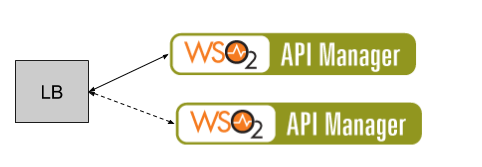
What if you want HA? This is the next level. You need  high availability. The system should be up and running 99.99%. Then you will need another node.


Pros
1 - The system is highly available
2 - The cost is for single instance and you will get 24*7 WSO2 production support
3 - Deployment is up and running within hours

Cons
1 - Not network friendly. Where are you going to run this instance? Not in DMZ as this need a database connectivity.
2 - The supported load really depends on your use-case

What if your load goes high? You can make the passive node as a traffic serving node. This means production subscription changes from 1 instance to 2 instances. 


Pros
1 - The system is highly available
2 - The cost is for two instance sand you will get 24*7 WSO2 production support
3 - Deployment is up and running within hours

Cons
1 - Not network friendly. Where are you going to run this instance? Not in DMZ as this need a database connectivity.
2 - The supported load really depends on your use-case


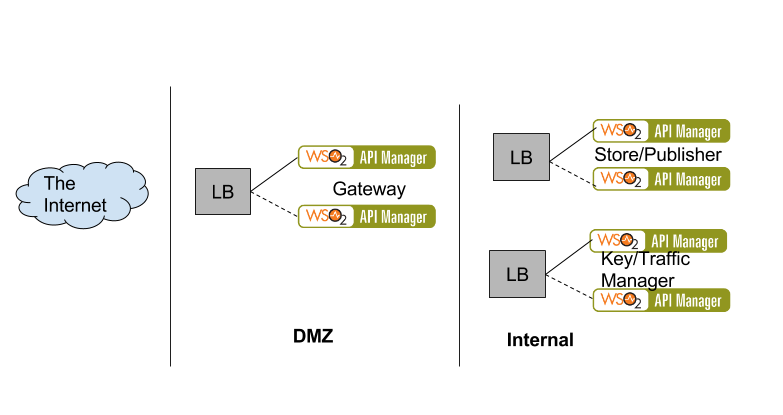
What if you want to support more TPS OR complex throttling OR adhere to standard network patterns, where the un-trusted connections are throttled out at the gateway itself. Then you need a distributed deployment where the deployment looks like below. This deployment allows different functional component of API management to scale differently - and these components scale at different proportions.


For this type of deployments you can get solution architecture help from the WSO2 team. This is an API empire that needs to be planned precisely. 

Monday, June 13, 2016

Continuous Integration for WSO2 Artifacts

This blog will walk you through a set of best practices, guidelines, tips and tricks to setup an efficient software delivery lifecycle for WSO2 middleware platform. It explains how to apply generic software development best practices such as managing configurations, continuous integration, continuous deployment and build-once-deploy-everywhere concepts to WSO2 platform. The result is an efficient software delivery process for WSO2 platform that integrates into the organization software development toolset and lifecycle. 

WSO2 middleware platform has a story for comprehensive development, deployment and delivery. WSO2 platform ships with Developer Studio - an Eclipse based graphical editor to create artifacts such as services and integrations and manage links dependencies between the artifacts. When Developer Studio integrates with continuous integration and deployment it will provide a very comprehensive story.


Development Time Best Practices


All development efforts universally go through minimally two stages - dev and production environment. Ideally in a large organization, there are well established environments on which artifacts needs to be tested before going live. When WSO2 platform is introduced into such an environment it needs to plugin to the existing software development lifecycle tool set seamlessly. An existing software delivery process can be as follows.


WSO2 artifacts can plugin to the above CI seamlessly, provided that the your project is structure properly.
Organizing your Project

Applications/artifacts on WSO2 platform connect to systems and databases, which will change depending on the environment. Mostly, we have observed that the following vary between environments. We are going to call these “external references” in the rest of the article.
  • Endpoints and credentials to external systems - In ESB artifacts
  • Database connection details - ESB artifacts, Services, Web apps and Data Services


As these external references keep changing per-environment. How do we change values between environments? What if the code en-composes external references in the integration logic itself? This is a big NO. You’ll have to modify the deploy-able artifact at each stage, which is error prone and very primitive way of development. It is not at all deploy-friendly or CI/CD friendly. The key is to separate the main logic from external references, external references and configurations will keep changing based on the environment but the main logic will stay the same throughout.

Use Developer Studio for the development. Separate out main logic from environment specific configurations. You can follow the steps here [1]. A sample workspace that configured for the Dev/Test environments is as follows.
Screen Shot 2016-06-13 at 1.30.13 PM.png
A separate java project has been added to write tests for the CRM integration project. Any technology that can send HTTP calls would serve the purpose, including Jmeter tests. The MainESBConfig project has the main logic of the project.

Setting up CI/CD for Environments

When a project workspace is organized to as above it can be configured in a CI system to do continuous build and deployment. The typical steps of a CI includes,
  • Build the CRM integration project each time a commit happens
  • Deploy the artifacts each time the build is successful
  • Run tests against the Development environment
  • Then periodically at a predefined time deploy the CRM integration project to the PreProd environment, if all the tests are successful

When all of the above actions are configured in a CI, it would create a build pipeline, that delivers software to Preprod stage. Let’s see how to configure that using Jenkins.

Step 1 - Configure CI System to build the CRM integration project each time a commit happens

Deploying artifacts can be handled by the maven-car-deployer plugin. It can handle the following artifacts successfully.
  • ESB artifacts
  • AS artifacts
  • DSS artifacts
  • DAS artifacts
  • BPS artifacts

Create a CAR file per environment and add the maven-car deployer plugin to the pom.xml of each CAR fie. By default Developer Studio adds the maven-car-deployer plugin to every CAR project.

For example dev and test environment CAR files can be shown as below along with their CAR deployer plugin.


Screen Shot 2016-06-13 at 2.18.29 PM.png
Screen Shot 2016-06-13 at 2.18.21 PM.png
Screen Shot 2016-06-13 at 2.20.53 PM.png


Screen Shot 2016-06-13 at 2.22.28 PM.png

Now Configure the Dev CAR file to be deployed to the above dev environment using the CI system. First build the maven-multi-module project each time a developer commits.


Screen Shot 2016-06-13 at 4.36.01 PM.png

Step 2 - Configure CI to deploy the artifacts each time the build is successful.

Screen Shot 2016-06-13 at 4.40.01 PM.png

When deploying BPS artifacts such as BPEL processes it will delete all of the old instances. If the preferred behavior is, old instances using the old BPEL process and the newly initiated instances using the new BPEL process, then BPS artifacts needs to be deployed as a *.zip archive separately. It can be done using ant scp task inside a maven-antrun-plugin.

Step 3 - Configure CI to run the tests against the development environment

Configure the automated tests as a downstream build job of the development build job defined above. Each time the deployment happens, the tests are run against it.

Screen Shot 2016-06-13 at 3.47.54 PM.png


Step 4 - Configure CI to periodically at a predefined time deploy the CRM integration project to the PreProd environment, if all the tests are successful

If the above build is stable then move the artifact to the PreProd environment by adding a periodic build that runs only if the CRMTest build job is stable. A build is stable only if all the tests are passing.


Screen Shot 2016-06-13 at 3.49.52 PM.png

Conclusion

It is possible to setup a CI/CD for WSO2 platform artifacts very easily and create an efficient software delivery process with development best practices. In this way you can automate deployment to production as well, but the “revert back” procedure which must kick-in if something goes wrong must be planned along with it.